
The AI Engineer Cheatsheet
7 skills, 7 free courses, 7 interview questions, and the starter prompts I use. Save this one.

Save this one.
This is the resource pack I wish someone handed me a year ago, when “data scientist” started meaning something different than what my data program said it meant.
Below, you’ll find the 7 skills companies are actually paying for in 2026, one free course for each, one starter prompt or short code snippet for each, and one interview question (with how I’d think through it) for each.
Plenty of value if you skim. More if you actually pick one and build with it this week.
Here’s the stack, head to toe.
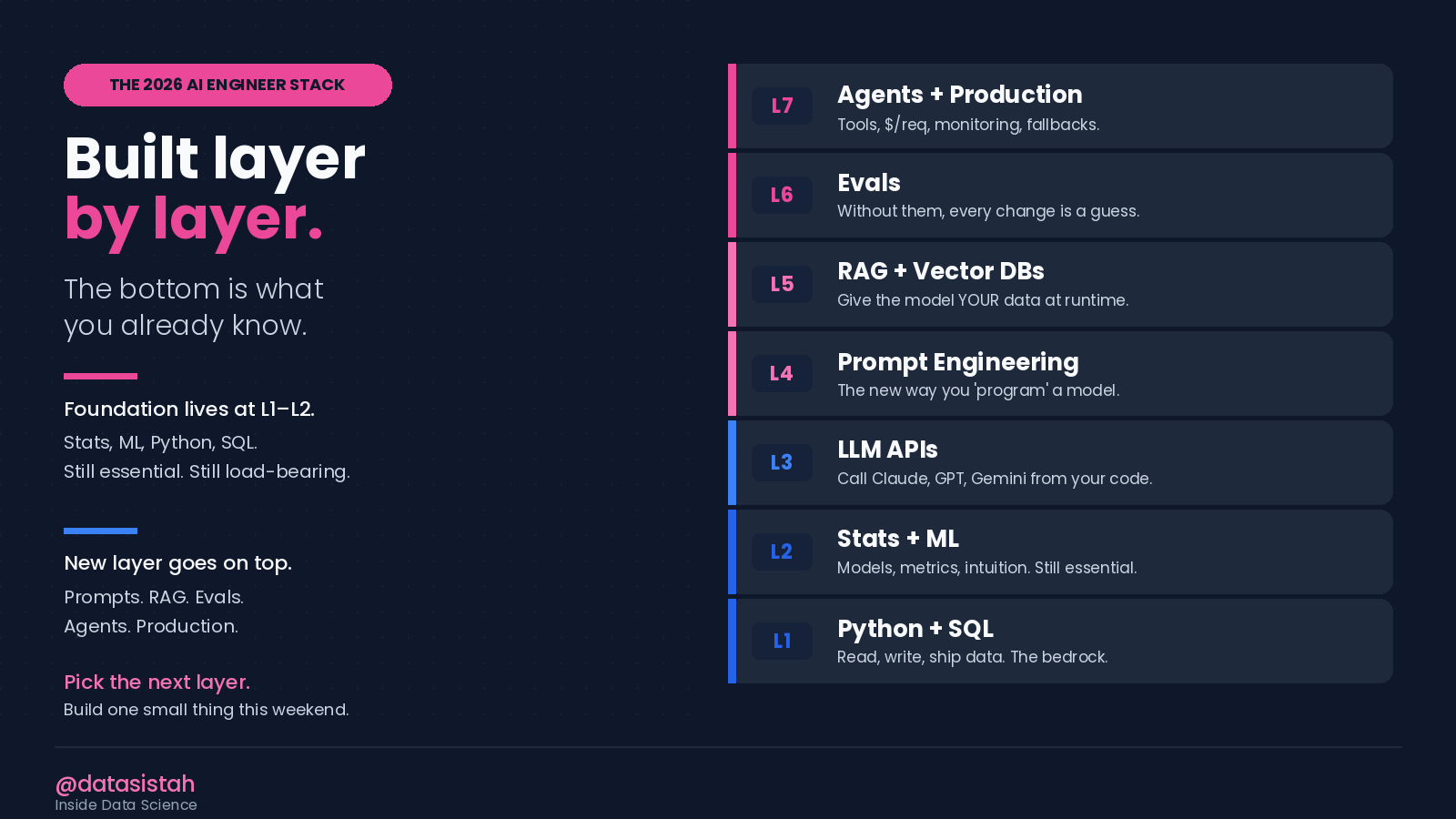
AI Engineer Stack
Skill 1. Prompt Engineering
What it is. Writing the instructions a model uses to produce a good answer. The new way you “program” a model.
Why it pays. Every AI feature in every product ships with a prompt behind it. If the prompt is bad, the product is bad. There is no other option.
Free course (highest leverage). Anthropic’s Prompt Engineering course. It is short, free, and a great place to start.
Starter prompt to steal. Use this 5-part template every time you write a prompt that matters:
ROLE: You are a [specific role] at a [specific company type].
TASK: [What you want done, in one sentence.]
FORMAT: [Exact shape of the output. Bullets, JSON, max length.]
CONSTRAINTS: [What NOT to do. What MUST be true.]
EXAMPLES: [1 to 2 input then output pairs.]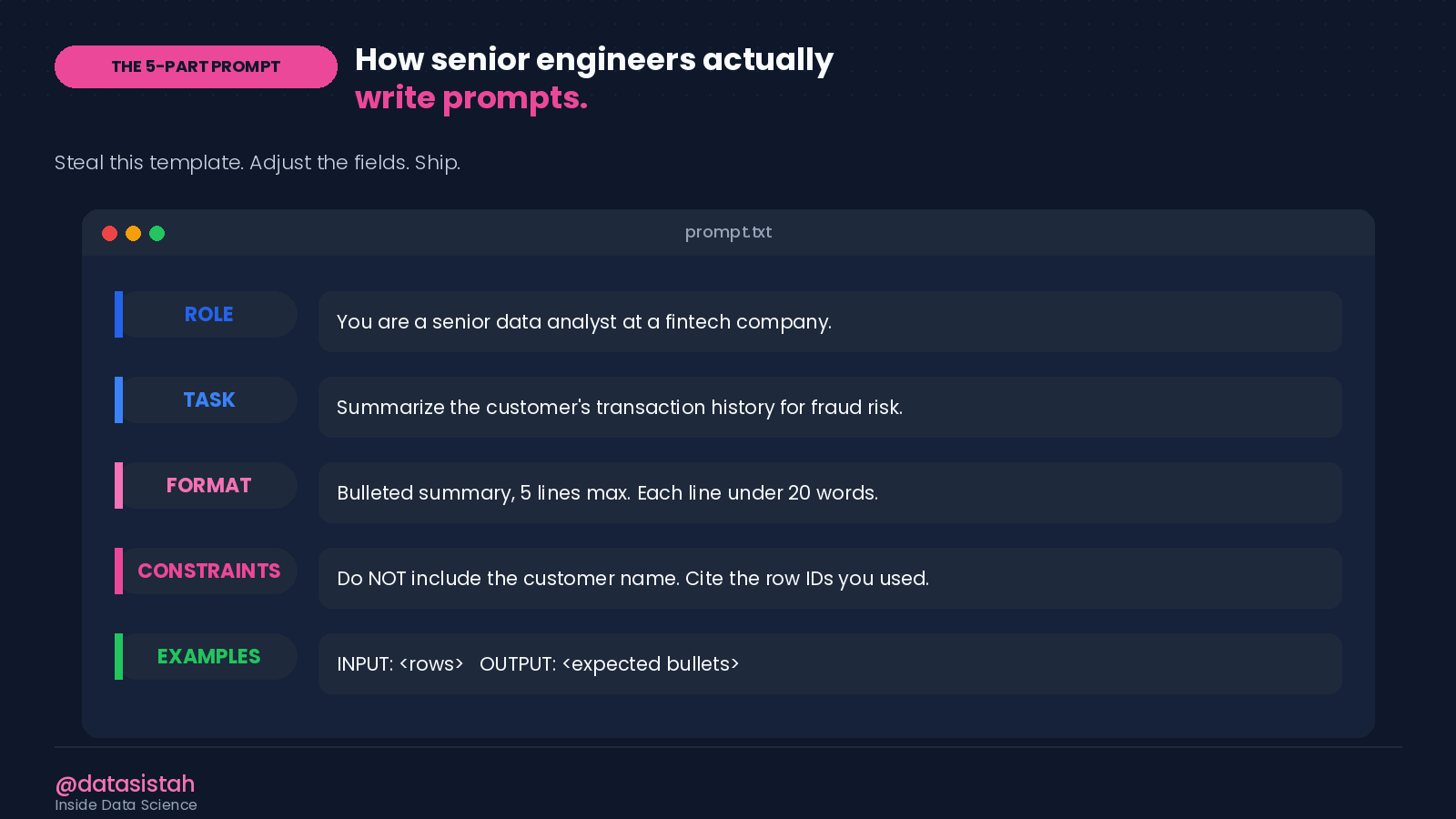
5-Part Prompt Template
Interview question. “You’re asked to summarize a customer support ticket for an executive dashboard. Walk me through your prompt.”
How I’d think through it, out loud:
Who reads the summary (an executive, so keep it short).
What decision does it support (route ticket priority).
What format do they need (one line, severity, action).
Then I write a Role / Task / Format / Constraints prompt that matches those answers, and I tell the interviewer what I would change if quality wasn’t good enough (add 2 example pairs).
The interview is not testing whether you can write a perfect prompt. It’s testing whether you can think about the user before you think about the model.
Skill 2. Working with LLM APIs
What it is. Calling Claude, GPT, Gemini, or an open model from your own code instead of a chat window. Every shipped AI feature ships through an API.
Why it pays. APIs turn a model from a toy into a teammate. The hour you spend wiring your first API call pays back forever.
Free course. Anthropic’s API quickstart or OpenAI’s quickstart. Both walk you from “blank file” to “live API call” in less than 30 minutes.
Starter code (Python, 5 lines):
from anthropic import Anthropic
client = Anthropic()
msg = client.messages.create(
    model=”claude-sonnet-4-5”,
    messages=[{”role”: “user”, “content”: “Summarize: <your text here>”}],
    max_tokens=300,
)
print(msg.content[0].text)
Swap anthropic for openai if your team has Codex or GPT instead. The shape of the call is almost identical.
Interview question. “You’re given a folder of 10,000 customer emails and 24 hours to find the top three complaint themes. How do you use an API to do it.”
How I’d think through it. I would not throw all 10,000 emails at the model at once. I’d sample 200, classify them with one API call per email into themes the model proposes, count the themes, then run a second pass over a larger sample to confirm. Out loud, I would talk about cost per call, batching, and what I’d do if classification quality was bad (write 5 labeled examples and add them to the prompt).
The interview is testing whether you can break a fuzzy problem into API-sized pieces.
Skill 3. RAG (Retrieval-Augmented Generation)
What it is. Giving a model your data at runtime so it answers with the right context, instead of guessing.
Why it pays. This is the #1 AI engineering pattern in production today. Job postings that mention RAG carry a 25 to 40% pay premium versus generic AI roles, per current 2026 listings.
Free course. LangChain’s “Build a RAG App” tutorial or LlamaIndex’s “Hello World.” Either gets you a working RAG over your own PDFs in an afternoon.
Starter project to build this week. Set up a 50-line RAG over a folder you care about. Your school readings, your team’s docs, the last six months of your favorite newsletter. Anything where being able to ask the folder questions saves you real time.
How it works in one picture:
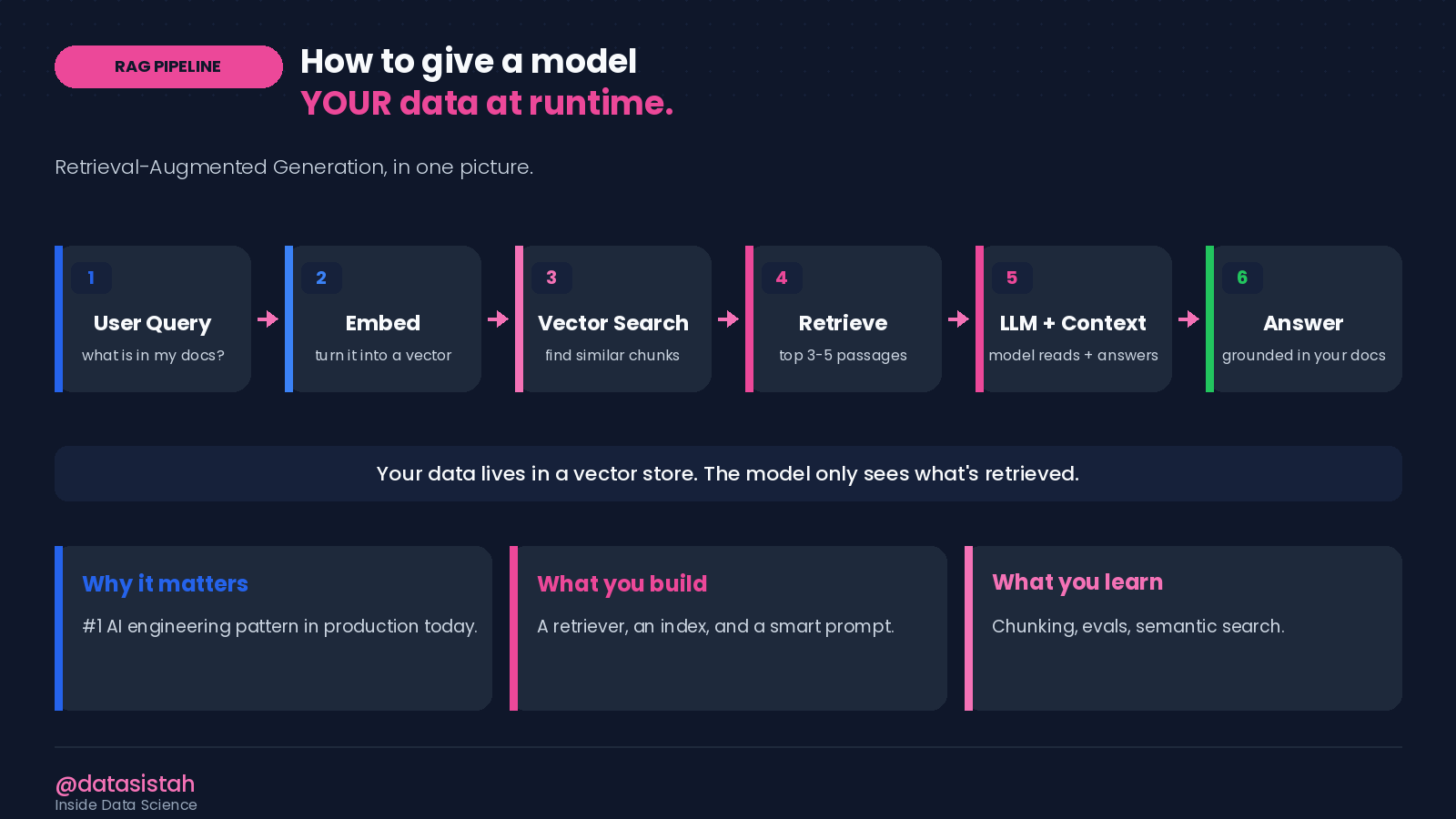
RAG Pipeline
Interview question. “Your RAG system is returning answers that sound right but are wrong. Where do you look first.”
How I’d think through it. Three places, in order:
Retrieval. Am I actually pulling the right chunks. Pull the top 5 chunks for a failing question and read them.
Chunking. Are the chunks too big (model gets confused) or too small (key context is split across chunks).
Prompt. Am I telling the model to “answer only from the context” or letting it freelance.
That ordered walk-through is what gets you the role. Not memorizing chunk sizes.
Skill 4. Vector Databases
What it is. A database that searches by meaning, not by keyword. The retrieval engine behind every RAG system, semantic search, and recommendation feature.
Why it pays. RAG is the pattern. Vector DBs are the plumbing. You can’t ship one without the other.
Free starter. Chroma. One line of pip install, one line of Python to start. The simplest possible entry point. If your company uses Pinecone, Weaviate, or pgvector, the patterns transfer.
Starter code (Python, 4 lines):
import chromadb
client = chromadb.Client()
col = client.create_collection(”my_docs”)
col.add(documents=[”...your texts...”], ids=[”doc1”, “doc2”])
print(col.query(query_texts=[”a question”], n_results=3))
Interview question. “Walk me through what an embedding is, in language a product manager would understand.”
How I’d think through it, out loud. “Imagine every sentence is a dot on a giant map. Sentences with similar meaning sit close together. An embedding is the coordinates of one dot. We store the coordinates, then when a user asks something, we find the closest dots and feed those sentences to the model.”
The interview is testing whether you can explain something technical in simple terms. Practice this out loud once and you’ll never blank on it again.
Skill 5. Evals and Testing
What it is. A small set of test cases that tell you whether your last change made things better or worse. Without evals, every change is a guess.
Why it pays. Evals are the difference between “I shipped a prompt change and hope it’s good” and “I shipped a prompt change and the regression test passed.” Companies pay for the second one.
Free course. Anthropic’s “Building Evals” guide. Short. Practical. You’ll have your first eval set running the same day you read it.
Starter recipe:
Pick 5 to 10 real inputs your system will see.
Write the ideal output for each.
Run your current system on the inputs.
Score outputs from 1 to 5 by hand (or have the model judge).
Now every change is measurable.
Interview question. “How would you measure whether your AI assistant is getting better over time.”
How I’d think through it. Three layers, in order:
Did the output match the expected answer (offline eval set).
Did the user accept it (production telemetry, thumbs up / down).
Did the customer come back (business outcome, retention or task completion).
Anyone can talk about accuracy. Senior candidates talk about the user’s decision and the business outcome too. That’s the answer that gets you the role.
Skill 6. Agents and Tool Use
What it is. A system where the model can take actions, not just produce answers. It can call a tool, read a file, run a search, then decide what to do next. Repeat until done.
Why it pays. This is the fastest-growing area of the field. Most enterprise “AI assistant” features being built right now are agents under the hood.
Free course. Anthropic’s “Building Effective Agents” essay. Read it twice. The second read is when it actually clicks.
The loop, in one picture:
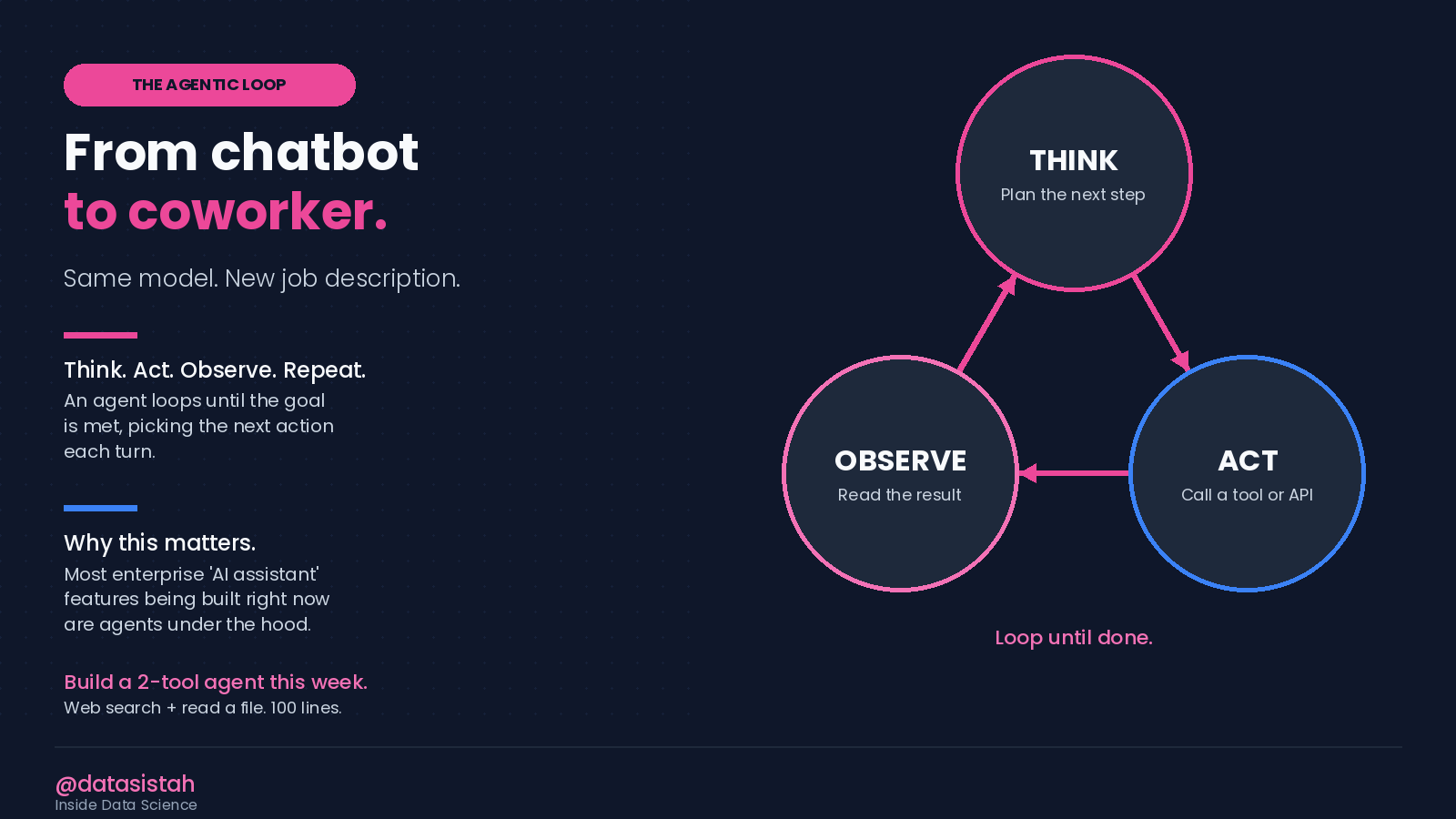
The Agentic Loop
Starter project. Build a 2-tool agent. One tool that searches the web. One tool that reads a local file. Give it a goal like “find the top 3 news stories about my company this week and save a summary to a markdown file.” 100 lines of Python, one afternoon.
Interview question. “Your agent goes into a loop and won’t stop. What’s broken and how do you fix it.”
How I’d think through it. Two likely causes:
First, the agent isn’t sure when the goal is met (vague stop condition; fix by adding “respond DONE when you’ve completed all 3 steps” to the system prompt).
Second, the tool result format is confusing the model (a search returns 50 results, the model thinks it has to read all of them; fix by truncating tool output and adding a max-iterations guardrail).
If you have a confident answer to “what’s the stop condition,” you have a senior answer. Most candidates miss this.
Skill 7. Production Engineering
What it is. Latency, cost, monitoring, fallbacks. The boring stuff that decides whether your AI ships or quietly dies in a Slack thread.
Why it pays. Anyone can demo an AI feature. Very few people can run one in production at 2 a.m. when it’s misbehaving. Companies pay a premium for the second skill.
Free starter. The OpenAI Cookbook plus your own request logs. Read your own logs for one week. You’ll learn more than most courses can teach.
Starter checklist:
Track every API call (input, output, latency, cost).
Have one fallback path if the API is down.
Set a hard cost ceiling per user per day.
Log refusals separately from errors.
Interview question. “Your prompt costs $0.40 per call. The product can only afford $0.04. What do you do.”
How I’d think through it, in order:
Shorten the system prompt. Most prompts are 4x longer than they need to be.
Move to a smaller model for the easy 80% of cases. Route only the hard 20% to the big model.
Cache repeated calls. Two users asking the same question shouldn’t both pay full price.
If still over budget, change the product (offer the AI feature only on the paid tier, or behind a “show me more” click).
Talking about engineering tradeoffs at the product level is how you stop sounding like a junior. Try it on a friend.
Two pieces of honest advice before you start
Pick one. Not seven. Open your calendar. Block 90 minutes this week. Pick whichever skill in the list scares you a little less than the others. Build the starter project. Tell three people what you learned.
The tools don’t matter as much as you think. I use Claude for my personal work. I use GitHub Copilot at work every day. I have access to Codex. The premium models you keep hearing about are reachable through several platforms, not only one. If your company licenses Copilot or Codex, you are not behind. The thinking transfers. The patterns transfer. Get good at the tool you can actually use today.
If You Want Help With This
This is something I still talk through with people all the time. Inside Inside Data Science with Data Sistah, we work through how to pick the right skill to invest in first, how to build a starter project that proves it, and how to talk about that project in an interview without faking the parts you don’t know.
Paid subscribers get every subscriber-only post, the full archive, and can post comments and join the community.
✨ If this helped you think about your approach differently, restack it so someone else can see it.
P.S. If you had to pick just one of these seven to learn this week, which would it be and why?
Thanks for reading Inside Data Science! This post is public so feel free to share it.
About the Author
I didn’t start my career in tech. For 20 years, I taught high school math. In my 40s, I made the decision to start over and transition into data science. My first data science interview ended in rejection because I didn’t know BERT. Instead of giving up, I learned what I was missing, followed up with the same hiring manager, and eventually earned the job I was originally rejected from. That experience changed how I approach this field.
Today I work as a Data Scientist and AI Developer, building applied AI systems and working on real-world machine learning projects. Along the way, I’ve been recognized as a LinkedIn Top Voice (2024–2025), named one of the Amazing People at LexisNexis, and my transition story has been featured by Udemy and KDnuggets. I share what I learned the hard way to help aspiring data scientists, students, and career changers better understand how this field actually works.
If you’re trying to break into data science or understand how the job market really works today, you’ll probably find my newsletter useful.
Inside Data Science with Data Sistah
(Paid subscribers receive every subscriber-only post, the full archive, and can post comments and join the community.)
Let’s Connect
If you’re on LinkedIn, feel free to connect with me.
If you found this article through Substack, send a quick note and let me know. I love hearing what you’re working on, and reader questions shape what I write next.
https://www.linkedin.com/in/tiffany-teasley/